
Last updated on
Nov 6, 2026

medpartners COB Form 2008-2026 free printable template
pdfFiller is not affiliated with any government organization

Fill out
Complete the form online in a simple drag-and-drop editor.

eSign
Add your legally binding signature or send the form for signing.

Share
Share the form via a link, letting anyone fill it out from any device.

Export
Download, print, email, or move the form to your cloud storage.
Why pdfFiller is the best tool for your documents and forms


End-to-end document management
From editing and signing to collaboration and tracking, pdfFiller has everything you need to get your documents done quickly and efficiently.
Accessible from anywhere
pdfFiller is fully cloud-based. This means you can edit, sign, and share documents from anywhere using your computer, smartphone, or tablet.
Secure and compliant
pdfFiller lets you securely manage documents following global laws like ESIGN, CCPA, and GDPR. It's also HIPAA and SOC 2 compliant.
What is medpartners COB Form
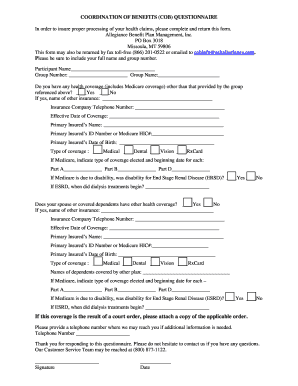
The MedPartners Coordination of Benefits Questionnaire is a healthcare form used by members to notify MedPartners Administrative Services of Medicare or other health insurance coverage for Coordination of Benefits (COB).
pdfFiller scores top ratings on review platforms




Great merging ability and easy faxing. I used the PC version and this is better in the on line format.
I have only used it for 5 forms but it works well. I needed this
Very user friendly,save me time, storage, and reasonably priced.
It's awesome to be able to prefill fields!!!
I Love PDF Filler
very easy to use
a great place to keep my documents that require editing
functionality allows me to do almost anything to a PDF
I really have no cons, I have been a user for some time and plan to stay
A must have for your business
Overall, this software is a very useful, less time consuming, and efficient addition for my business. I love that I can complete and sign required documents on the go with no hassle, without having to print and physically complete and sign any document.
I love that this software is so convenient and easy to use. Its a must have for completing and signing documents for your business electronically in a quick and efficient manner.
The mobile app for this software is not that easy to use as the online (desktop) version.
Who needs medpartners COB Form?
Explore how professionals across industries use pdfFiller.

Medpartners COB Form is needed by:
-
MedPartners members needing to report health coverage.
-
Individuals with multiple insurance policies.
-
Dependents requiring special health coverage situations.
-
Healthcare providers submitting claims.
-
Insurance representatives seeking verification.
Comprehensive Guide to medpartners COB Form
What is the MedPartners Coordination of Benefits Questionnaire?
The MedPartners Coordination of Benefits Questionnaire is a crucial form designed to inform MedPartners Administrative Services about any other health insurance coverage a member may have. Properly completing this form helps ensure that claims are processed efficiently without delays, which is vital for receiving timely healthcare benefits. By notifying MedPartners about alternative coverage, members can prevent potential disruptions in claim payments.
Purpose and Benefits of the MedPartners COB Questionnaire
Filling out the MedPartners COB Questionnaire is essential for several reasons. Firstly, this form facilitates the coordination of benefits between multiple insurers, ensuring that claims are handled efficiently. Secondly, it provides several benefits for members, including streamlined claims processing and minimizing the risk of delays when seeking reimbursement for medical services. Accurate information regarding dependent children and Medicare coverage is critical, as it can significantly affect claims processing and approval.
Key Features of the MedPartners COB Form
The MedPartners COB Form includes several essential components that make it user-friendly and efficient. Key sections of the form cover:
-
Other health coverage details
-
Dependent information
-
Medicare coverage specifications
This fillable format enhances ease of use, allowing members to complete the form digitally. Instructions for submission and the member's signature are also clearly outlined, ensuring all necessary steps are followed before sending it to MedPartners.
Who Needs to Fill Out the MedPartners COB Questionnaire?
Members eligible to complete the MedPartners COB Questionnaire include those with additional health insurance coverage or Medicare. Special situations may apply to dependent children, necessitating extra information. This form is particularly important for members who have Medicare in conjunction with secondary insurance, as it aids in ensuring all coverage options are utilized effectively.
How to Fill Out the MedPartners COB Questionnaire Online (Step-by-Step)
Follow these detailed steps to complete the MedPartners COB Questionnaire online:
-
Access the MedPartners COB form via the designated digital platform.
-
Carefully fill out each section, beginning with personal identification information.
-
Provide accurate details regarding any other health insurance coverage.
-
Include information pertaining to dependent children, if applicable.
-
Review all entries for accuracy, ensuring no fields are left blank.
-
Sign the form electronically before submission.
After completing the form, take the time to double-check your entries to avoid any errors that could cause delays.
Common Errors and How to Avoid Them When Submitting the COB Questionnaire
When filling out the MedPartners COB Questionnaire, members often encounter common mistakes that can hinder the claims process. These include:
-
Omitting signatures or initials where required
-
Leaving mandatory fields incomplete
-
Failing to provide accurate information regarding coverage
To prevent these issues, it is advisable to double-check all information before submission. Ensuring accuracy is crucial for effective claims processing and prompt payment of benefits.
Submission Methods and Delivery for the MedPartners COB Questionnaire
Once you have completed the MedPartners COB Questionnaire, you can submit it through several convenient methods. The options include:
-
Mailing the form to the specified address
-
Submitting the form electronically through the designated online portal
It is essential to adhere to submission deadlines and be aware of the processing times. For those opting for electronic submissions, rest assured that robust security measures are in place to protect your sensitive data.
What Happens After You Submit the MedPartners COB Questionnaire?
After submitting your MedPartners COB Questionnaire, it is important to monitor the claims processing timeline. Typically, you can expect to:
-
Receive confirmation of receipt from MedPartners
-
Be informed if additional information is required
-
Follow designated next steps in case of issues arising from your submission
Staying updated on your submission's status will ensure you are aware of any potential follow-ups needed for your claims.
Using pdfFiller to Complete Your MedPartners COB Questionnaire
pdfFiller offers an invaluable resource for effortlessly filling out the MedPartners COB Questionnaire. Key benefits of using pdfFiller include:
-
Easy editing features for any necessary changes
-
Electronic signing options for quick completion
-
Secure document handling in compliance with regulations such as HIPAA and GDPR
Step-by-step guidance on how to fill out and submit the form via pdfFiller is available, streamlining the entire process for users.
Security and Privacy for Submitting Your MedPartners COB Questionnaire
When dealing with sensitive health information, understanding security and privacy measures is crucial. pdfFiller ensures document security through:
-
256-bit encryption for all data transmissions
-
Compliance with industry regulations such as HIPAA and GDPR
These measures are designed to protect your personal information during the submission process, providing users with peace of mind.
How to fill out the medpartners COB Form
-
1.Access the MedPartners Coordination of Benefits Questionnaire on pdfFiller by visiting their website and searching for the form using its title.
-
2.Once open, familiarize yourself with the layout and sections of the form. pdfFiller allows you to click into each field to start entering information.
-
3.Gather necessary information before you begin filling out the form, including your insurance details, Medicare information, and any relevant prior coverage.
-
4.Start filling in the 'Other Health Coverage' section, providing all requested details about your additional insurance policies and their coverage specifics.
-
5.Complete the section regarding special situations for dependent children if it applies to you, as this is crucial for accurate COB processing.
-
6.Proceed to fill in the Medicare coverage details, making sure all the information is correct and up-to-date.
-
7.After completing all sections, review your responses to ensure accuracy. Check for any missed fields or required fields marked clearly in pdfFiller.
-
8.Finalize your form by applying your electronic signature in the designated area. Make sure to date the form appropriately as well.
-
9.Once everything is complete, save the document by selecting the download option on pdfFiller or submit it directly via email if that option is available.
-
10.Ensure you keep a copy for your records after downloading, in case you need to reference your submission in the future.

Who is eligible to fill out this form?
Members of MedPartners, individuals with Medicare or other health insurance coverage, and those needing to report COB are eligible to fill out the MedPartners Coordination of Benefits Questionnaire.
What is the deadline for submitting the form?
While specific deadlines are not listed, it is advisable to submit the Coordination of Benefits Questionnaire as soon as possible to prevent delays in claim payments.
How should I submit the completed form?
Completed forms can be submitted by downloading and emailing the document directly to MedPartners Administrative Services or printed and mailed to the appropriate address.
Are there any supporting documents required?
You typically do not need supporting documents with the questionnaire itself, but having your insurance cards and previous policy details on hand is recommended while filling it out.
What common mistakes should I avoid?
To avoid mistakes, ensure you fill out all required fields completely, double-check dates and coverage details, and remember to sign and date the form before submission.
How long does processing of the form take?
Processing times vary, but expect a response to your submission within a couple of weeks. You can check with MedPartners for specific timelines.
What should I do if I encounter issues while filling out the form?
If you run into issues, consider using pdfFiller's help resources or contact MedPartners Administrative Services for assistance with the Coordination of Benefits Questionnaire.
Related Forms



Related Catalogs
Get the latest insights from our blog


If you believe that this page should be taken down, please follow our DMCA take down process
here
.
This form may include fields for payment information. Data entered in these fields is not covered by PCI DSS compliance.